How to Merge PDF Files Online with Live Preview (Step-by-Step Instructions)
Organizing multiple digital records into a single continuous file should not require installing bloated desktop programs or trusting sensitive personal files to unknown cloud servers. Here is how our browser-based utility lets you combine, reorder, preview, and download your PDFs in under 60 seconds:
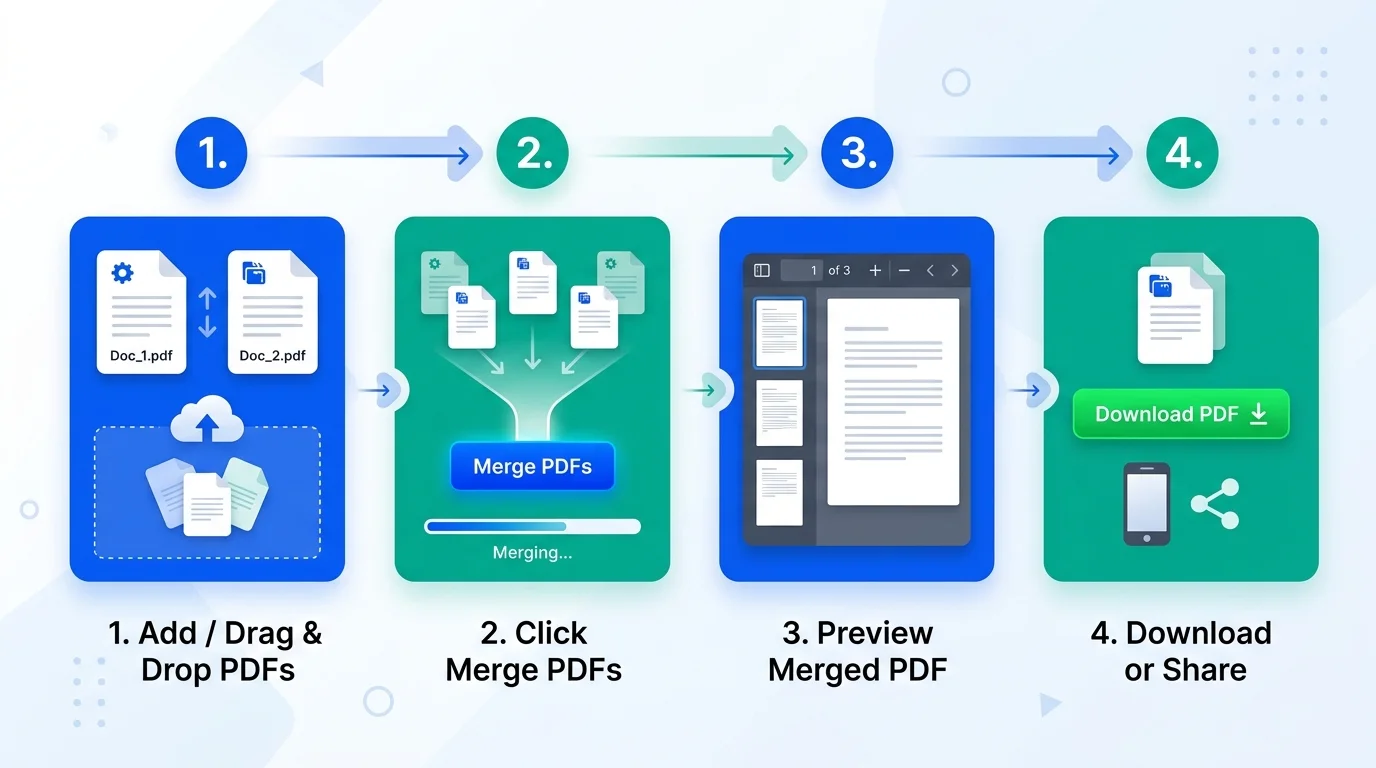
Select and Ingest Your Documents
Tap Select PDFs or drop your files directly into the dashed upload area. Our lightweight buffer system accepts multiple PDFs simultaneously without slowing down your phone or computer.
Arrange the Exact Page Sequence
Each uploaded file appears as an interactive card. Use the ↑ (Move Up) and ↓ (Move Down) arrows to organize your documents in precise chronological or checklist sequence.
Merge and Inspect in the Live Preview Window
Press Merge PDFs & View Preview. The tool compiles your file locally and immediately opens the interactive preview window. Flip through every page, zoom into signatures, and verify margins before saving.
Download or Share Straight to WhatsApp
Click Download Merged PDF to save the final document, or tap Share PDF to forward it immediately through WhatsApp, Telegram, or your phone's native sharing sheet.
Why Our In-Browser PDF Merger Eliminates Lag on Large Files
Many online PDF tools freeze browser tabs when processing files larger than 10MB or 20MB. This occurs because traditional scripts attempt to parse entire binary files synchronously on the browser's main user interface thread, starving the browser of render frames.
EasyJoinImage solves this through a buffered asynchronous execution pipeline:
- Lightweight File Pointer Ingestion: When you select your files, the merger stores lightweight operating system handles rather than decoding megabytes of raw memory upfront. This means selecting twenty 50MB PDFs happens instantaneously with zero stutter.
- Asynchronous Chunked Merging: During the merge operation, our engine processes each document sequentially, yielding execution back to the browser's event loop via micro-task scheduling. This maintains an uninterrupted 60 frames per second (fps) UI responsiveness.
- On-Demand Lazy Page Rendering: The built-in PDF.js preview canvas renders only the page currently visible on your screen. When you navigate to the next page, background graphics memory is immediately reclaimed via
page.cleanup(), preventing browser memory leaks and tab crashes on iPads and mobile devices.
100% Client-Side Architecture: Zero Data Leakage for Sensitive Documents
When compiling loan verification packages, tax returns, academic transcripts, or identity proofs, uploading documents to remote cloud servers creates severe privacy and compliance risks. Cloud converters frequently store files in unencrypted temp directories, subject them to automated OCR data mining, or log sensitive metadata.
EasyJoinImage operates under a strict Zero Server Upload Architecture. All binary manipulations, font embedding, and page concatenations execute exclusively within your browser's local sandbox using WebAssembly and client-side JavaScript. Your documents never touch our servers, cannot be intercepted over the network, and vanish from device memory the moment you close the tab.
PDF Stream Architecture: Preserving ISO 32000 Vector Quality and Searchable Text
Under the ISO 32000-1 international standard, a PDF file is not a flat image; it is an organized hierarchy of indirect objects, Catalog Dictionaries, Content Streams, Embedded Font Subsets, and an indexed Cross-Reference Table (XREF). Poorly engineered mergers flatten PDF pages into low-resolution raster images, which permanently destroys text searchability (Ctrl+F) and bloats file sizes.
Our tool performs lossless vector stream concatenation. It preserves embedded TrueType fonts, vector lines, electronic signatures, and hyperlinks. The resulting document is crisp, sharp at any zoom level, and lightweight—ideal for strict portal upload ceilings.
Comparison: In-Browser Client Merging vs Desktop Acrobat vs Cloud Uploaders
| Feature / Capability | EasyJoinImage (Browser) | Desktop Software (Acrobat) | Cloud Upload Websites |
|---|---|---|---|
| Data Privacy & Security | 100% Private (0 bytes uploaded) | Local on computer | High Risk (Stored on cloud servers) |
| Interactive Live Preview | Instant page-by-page preview | Full viewer included | Often requires paid upgrade |
| Performance on Large Files | Lag-free chunked buffering | Fast native code | Slow upload and download times |
| Cost & Access | 100% Free Forever | Costly annual subscription | Freemium with daily quotas |
| Direct WhatsApp Sharing | Built-in one-tap share button | Manual file attachment | Rarely supported |
Portal Compliance Guidelines for Indian Exams and E-Filing
Online recruitment and academic portals in India enforce stringent document combination rules. Merging your papers correctly avoids outright form rejection:
| Portal / Organization | Standard Submission Rule | Recommended Merge Strategy |
|---|---|---|
| UPSC DAF (Civil Services) | Single PDF for matriculation, degree, & category | Arrange chronologically; keep total size under 3 MB |
| SSC CGL / CHSL / MTS | Consolidated educational & experience certificate | Place 10th marksheet first, followed by higher degrees |
| IBPS / SBI Banking PO | Combined KYC, caste & discharge certificates | Merge identity cards on top, followed by financial records |
| High Court & District E-Filing | Main petition followed by indexed annexures | Combine petition first, followed by numbered exhibits |
| Visa & Immigration (Schengen / Canada) | Continuous 6-month bank statements | Merge consecutive monthly PDFs without date gaps |
If your combined document exceeds portal size caps, use our companion JPG to PDF, PDF to JPG, or Resize Image in KB tools to optimize individual assets before re-combining.
Important: Check Official Portal Guidelines Before Use & Submission
While our tool performs high-precision online PDF merge with zero compression artifacts, candidates and users are strongly advised to verify the exact document upload specifications prescribed in the official notification or portal bulletin (e.g., UPSC, SSC, IBPS, NTA, State PSC, High Court E-Filing, or Visa Embassies) before final submission:
- File Size Caps: Many recruitment portals enforce strict file size thresholds (e.g., between 100 KB and 2 MB). Ensure your final merged PDF does not exceed the permissible portal ceiling.
- Page Sequence & Orientation: Verify that all certificates, marksheets, and annexures are arranged in the exact chronological or serial order specified in your application brochure, and that all pages are oriented upright (portrait).
- Legibility of Official Seals & Signatures: Inspect the live preview window to confirm that issuing authority stamps, roll numbers, dates of birth, QR codes, and digital signatures remain pin-sharp and easily readable.
- Password Protection: Official application servers reject encrypted documents. Please ensure no individual file retains password protection prior to executing your PDF to PDF merge.
Frequently Asked Questions
How does the live preview window work after merging?
Once you click the merge button, our system renders the combined document using high-performance PDF.js canvas technology. You can step forward and backward through all pages, zoom in to examine micro-text or signatures, and even launch the document in a full browser tab prior to downloading.
Can I merge password-protected PDF files?
If any of your uploaded PDFs are encrypted with an owner or user password, modern web security standards require removing the password prior to merging. Unprotected documents are joined instantly without restriction.
Is there an upper limit on how many PDFs I can combine?
There are no artificial limits or paywalls imposed by EasyJoinImage. You can combine 2, 5, 20, or more documents depending solely on your device's available memory.
How does the Share PDF button work on smartphones?
On mobile phones and tablets (Android and iOS / iPad), tapping the Share PDF button invokes the operating system's native Web Share API. This enables you to send the merged PDF directly to contacts on WhatsApp, attach it in Gmail, or save it to Google Drive in a single tap.
Do I need to install any application or browser extension?
No. EasyJoinImage works directly within any standard modern web browser—including Google Chrome, Apple Safari, Mozilla Firefox, Microsoft Edge, and Samsung Internet—without plugins or third-party extensions.
Alag-alag PDF files ko ek PDF me kaise jodein aur preview kaise dekhein?
Apni sabhi PDF files ko "Select PDFs" button se add kijiye. Unhe upar-neeche arrow se sahi kram me lagaiye, aur "Merge PDFs & View Preview" dabaiye. Turant aapke samne preview window khul jayegi jisme aap har page ko dekh sakte hain, aur neeche diye gaye Download ya Share button se PDF prapt kar sakte hain.
How to perform a PDF to PDF merge online for free?
To execute a PDF to PDF merge, open EasyJoinImage, click "Select PDFs" to choose your documents, arrange their sequence using the arrow controls, and click "Merge PDFs & View Preview". You can inspect the consolidated document page-by-page and download it with zero file limits.
Is it safe to merge PDF online for bank statements and government forms?
Yes, our online PDF merge tool operates 100% locally in your web browser. No files are uploaded to any external server or cloud storage, making it completely secure for confidential bank records, KYC proofs, marksheets, and identity documents.